 Punch
Punch
Square
Tus horas, directo a Square.
Conecta Square una sola vez, asigna a tu equipo y envía un período de pago completo de horas aprobadas a Square como tarjetas de tiempo. Sin hojas de cálculo, sin captura manual, sin copiar y pegar.
De aprobado a pagado, en un clic.
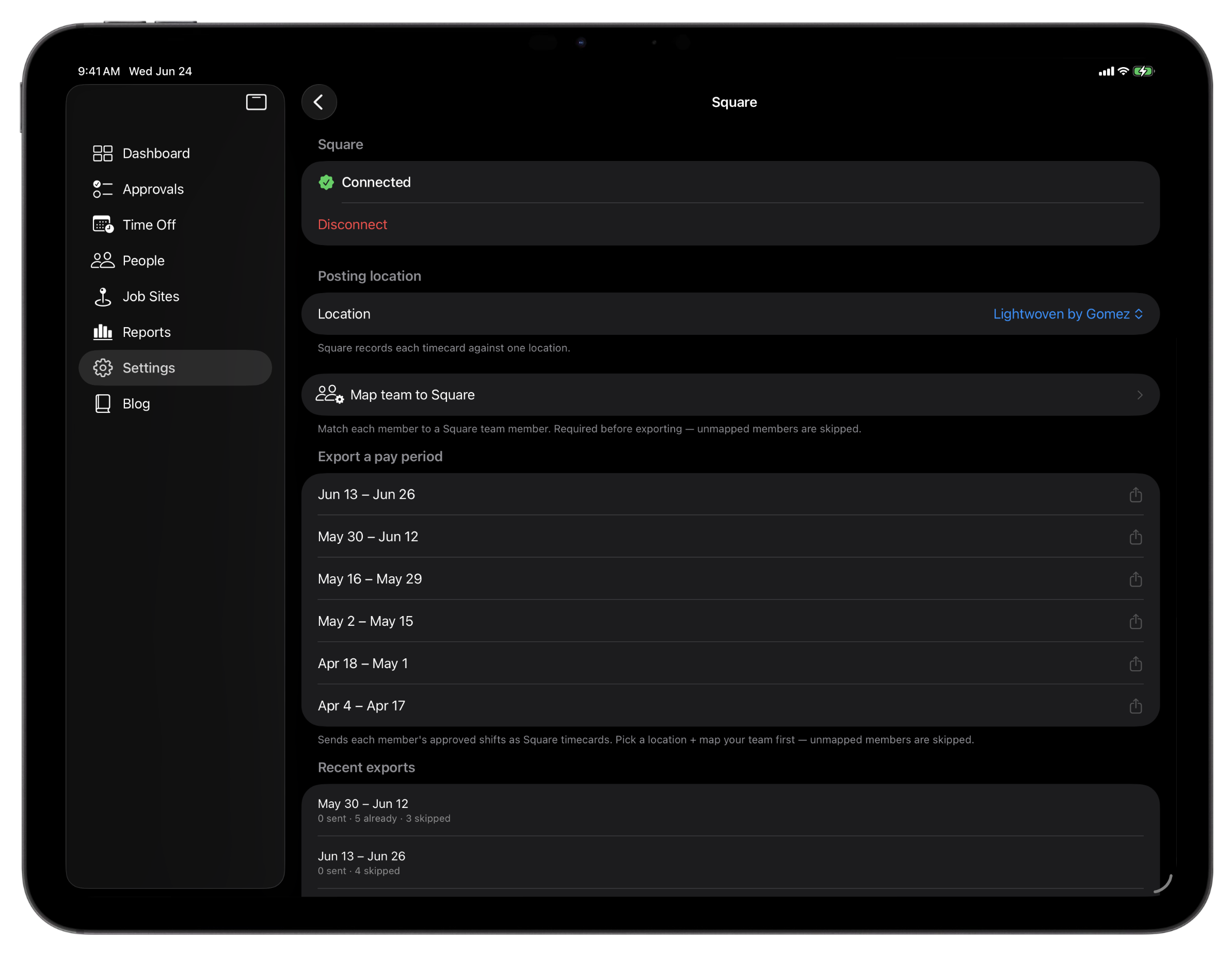
Conecta tu cuenta de Square desde Configuración en iPhone o iPad, con el inicio de sesión seguro de Square. Una vez conectado, eliges la ubicación de Square a la que se registran las horas, para que cada tarjeta de tiempo caiga en el lugar correcto.
Asigna cada persona de Punch a su miembro del equipo de Square una sola vez. Punch incluso hace la coincidencia automática de nombres para adelantarte camino, así que unos toques terminan la lista.
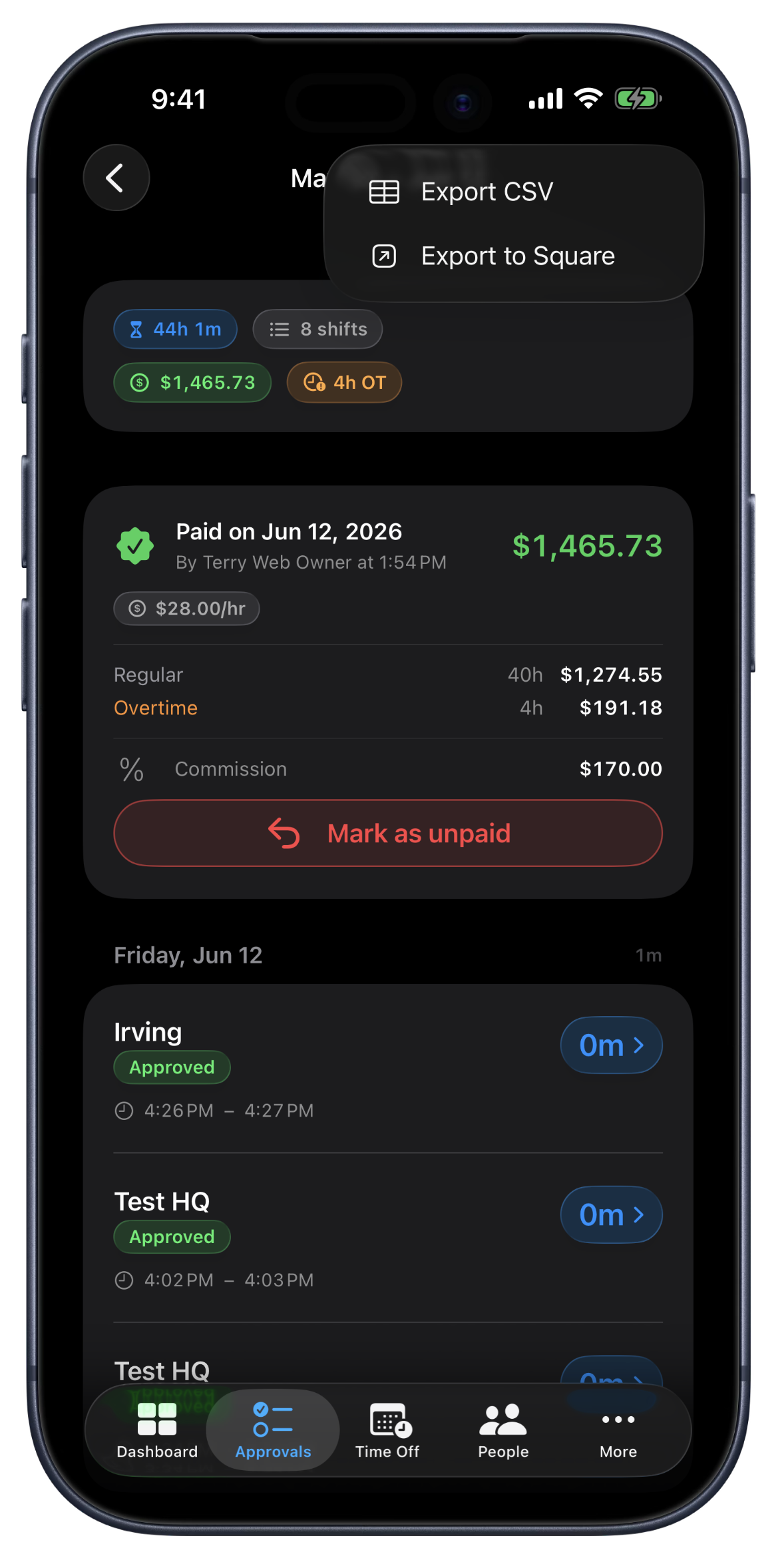
Cuando cierras un período de pago, Punch envía cada turno aprobado a Square como una tarjeta de tiempo: el miembro del equipo correcto, las horas trabajadas, la fecha y la ubicación que elegiste. Cada comida registrada se registra como un descanso, para que Square pague el tiempo trabajado. Luego Square Payroll hace el cálculo de la nómina sobre horas exactas. Punch lleva el tiempo; Square lleva la nómina.
Está hecho para que sea seguro ejecutarlo dos veces. Punch recuerda qué turnos ya envió, así que reexportar un período nunca crea tarjetas de tiempo duplicadas. Cada exportación queda registrada para que veas exactamente qué se envió y cuándo, y si una persona aún no está asignada, Punch te dice cuál en lugar de fallar en silencio.
Qué hace la integración con Square.
Conéctate una vez, elige tu ubicación
Vincula tu cuenta de Square desde Configuración con el inicio de sesión seguro de Square, y luego elige la ubicación de Square a la que se registran tus horas. La conexión se comparte en toda la organización.
Asigna a tu equipo una sola vez
Empareja cada persona de Punch con su miembro del equipo de Square. Los nombres coinciden automáticamente para que arranques, así que terminar la lista toma unos toques.
Exporta un período de pago completo
Marca un período de pago y envía cada turno aprobado a Square como una tarjeta de tiempo: la persona correcta, las horas, la fecha y la ubicación, todo en un clic.
Las comidas se vuelven descansos
Cada comida registrada se registra en Square como un descanso, para que Square pague el tiempo trabajado. El tiempo se queda en Punch; el cálculo de la nómina se queda en Square.
Sin tarjetas de tiempo duplicadas
Punch lleva el registro de qué turnos ya envió, así que reexportar un período es seguro. Nunca terminas con un turno contado dos veces.
Cada exportación registrada
Ve exactamente qué se envió y cuándo. Cuando una persona aún no está asignada, Punch la nombra y te dice por qué en lugar de fallar en silencio.
Dónde la integración con Square se gana su lugar.
Cierre de nómina el viernes
Aprueba la semana, marca cada período de pago y envía las horas a Square. La nómina arranca desde un tiempo exacto y ya aprobado.
Negocios que ya usan Square
Si ya usas Square para ventas y nómina, las horas de tu equipo entran directo como tarjetas de tiempo, en la ubicación que elijas, sin un segundo sistema.
Equipos en varias ubicaciones
Elige la ubicación de Square a la que se registra cada exportación, para que las horas caigan donde se hizo el trabajo y tu nómina siga organizada por sitio.
Preguntas frecuentes
Respuestas, claras.
- ¿Con qué Square funciona Punch?
- Punch se conecta a tu cuenta de Square y envía las horas aprobadas como tarjetas de tiempo, registradas en una ubicación de Square que tú eliges. Luego Square Payroll hace el cálculo de la nómina sobre esas horas.
- ¿Qué se envía exactamente a Square?
- Cada turno aprobado se va como tarjeta de tiempo: el miembro del equipo asignado, las horas trabajadas, la fecha y la ubicación que elegiste. Las comidas registradas se registran como descansos. Punch envía las horas, y Square hace el cálculo de la nómina sobre ellas, para que los dos sistemas se mantengan en su carril.
- ¿Exportar dos veces crea tarjetas de tiempo duplicadas?
- No. Punch recuerda qué turnos ya envió a Square, así que reexportar un período de pago solo envía lo nuevo. Volver a ejecutar una exportación siempre es seguro.
- ¿Puedo elegir a qué ubicación de Square van las horas?
- Sí. Eliges la ubicación de Square cuando te conectas, y cada tarjeta de tiempo se registra ahí. Los equipos en varias ubicaciones pueden enviar cada exportación al lugar correcto.
- ¿Tengo que conectar Square para usar Punch?
- Para nada. La integración es opcional y está incluida en cada plan. Conéctala cuando estés listo, y Punch empieza a enviar las horas aprobadas a Square como tarjetas de tiempo.
Sigue explorando.
Software de hojas de tiempo para equipos pequeños
Lleva hojas de tiempo semanales o quincenales por empleado, marca períodos de pago como pagados por método de pago, aplica reglas de tiempo extra y exporta cada período visible a Excel.
Más informaciónIntegración de QuickBooks Online para el control de tiempo
Conecta QuickBooks Online y envía un período de pago completo de horas aprobadas a tus libros en un clic. Asigna empleados, contratistas y equipos, sin entradas duplicadas.
Más información
Listo en un minuto.
Crea una organización. Comparte el código de invitación. Tu equipo hace punch in hoy mismo.