 Punch
PunchTime and pay for teams of every size
From punch-in to payroll-ready.
Without the spreadsheet.
Punch turns employee time into payroll-ready records automatically. Geofenced punch-in, approvals, PTO that accrues, commission done right, and exports your payroll already understands, on iPhone, iPad, and web, across 60 countries.
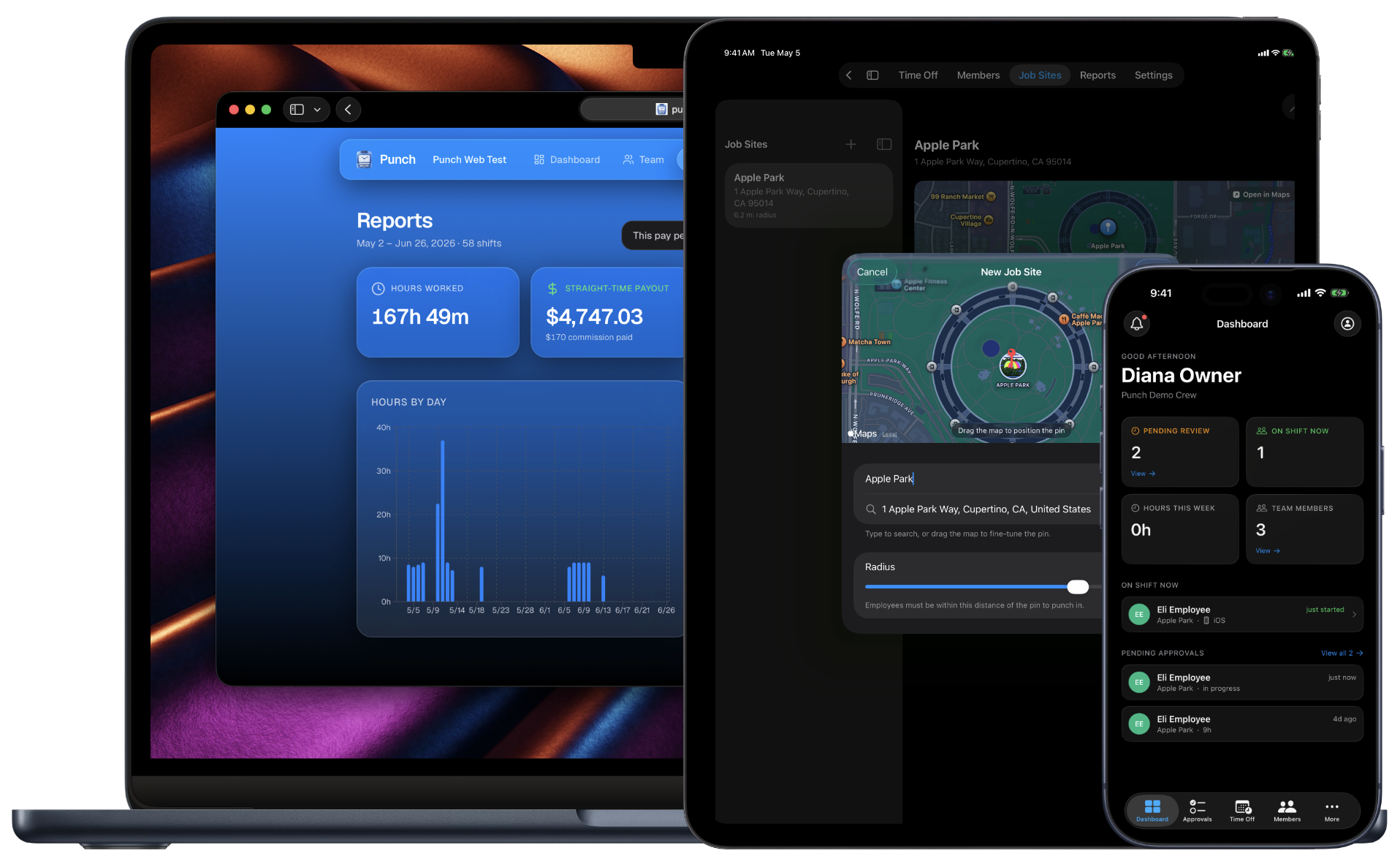
Punch is an employee time clock built for small field teams across 60 countries, a geofencing time clock for verified job-site time tracking, with approvals, weekly or bi-weekly timesheets, and reports everyone in the org can reach from iPhone, iPad, or web.
How it works
From the first punch to payroll-ready.
Punch turns raw punch-ins into payroll-ready hours, automatically. Overtime and time off do the math for you, so the week closes without a spreadsheet.
- Step 1
Punch in, verified
One tap on iPhone, iPad, or web. On iPhone and iPad, GPS confirms they're at the job site before the shift counts.
- Step 2
The clock runs
A live timer tracks the shift; lunch and breaks come out. Punch-out, lunch, and time off keep working offline and sync the moment signal returns.
- Step 3
Overtime, automatic
As the hours add up, Punch applies your country's overtime rules. No formulas, no spreadsheet math.
- Step 4
You approve
Every shift lands in the Approvals queue. Clear a whole pay period in one tap, or reject with a reason that reaches the employee.
- Step 5
Time off keeps its balance
PTO accrues on the schedule you set, and approved time off draws it down. No side tracker to reconcile.
- Step 6
Export, payroll-ready
Mark the period paid and export clean hours to Excel or a QuickBooks-ready file. Pull a weekly or monthly report any time.
Features
Built for every role.
Owner dashboard
See who's on shift, pending approvals, hours this week, and team size at a glance.
See the owner dashboardShift approvals
Review every completed shift with punch times, lunch, and payout. One-tap approve, or reject with a reason.
See shift approvalsTimesheets
Weekly or bi-weekly view per employee at a glance. Mark paid by payment method. Export to Excel in one click.
See TimesheetsTime tracking reports
Total hours, gross paid, daily hours, and top earners. Export to Excel or PowerPoint by week or month.
See time-tracking reportsGeofenced punch-in
iOS verifies the device is within the job-site radius before the shift counts. Peace of mind for you and your crew.
See geofenced punch-inTeam management
Invite by code, set pay rates, change roles, deactivate with a reason. Every change kept on the record.
See team managementPaid time off
Vacation, sick, and more accrue each pay period against a real balance. Employees request, you approve, the balance updates itself.
See time offCommission, bonuses & travel
Employees log sales, you approve them, and the period pays out with overtime done right. Travel hours at their own rate.
See how pay worksQuickBooks Online
Push a whole pay period of approved hours to QuickBooks Online in a click. Map your people once, with no duplicate entries.
See the QuickBooks integrationSquare
Push a whole pay period of approved hours to Square as timecards. Map your team once, pick your location, no duplicate entries.
See the Square integrationKiosk mode
Turn one shared iPad into a punch-in station for the whole crew. Name plus PIN, no work phone needed.
See kiosk mode
Beyond field crews
Built for restaurants too
Punch fits cafes, coffee shops, quick-service spots, and multi-location restaurant groups, any team paying per-employee for time tracking. One subscription covers every location.
See how Punch works for restaurantsThe office side of Punch
Clients, scheduling, and invoices — on the same hours
Punch tracks the time. CRMb, its companion app, runs the rest of the business — clients, scheduling, inventory, and invoicing — built on the hours your crew already punches.
See what CRMb doesFAQ
Questions, answered.
- How does Punch verify my employees are at the job site when they punch in?
- On iOS, Punch uses GPS to confirm the device is within a configurable radius of the assigned job site. Owners enable geofencing per-org and set the radius per-site. Web punches are gated separately, owners can disable web punching entirely if they prefer iOS only.
- Who uses iOS and who uses the web?
- Both platforms support every role. The iPhone and iPad apps are the only place the job-site GPS check happens, so most field employees use them as their primary device. Owners and managers can run the whole team, approvals, timesheets, reports, exports, from iPhone, iPad, and web, depending on whichever device is in your hand.
- Can I export timesheets and reports?
- Yes. Timesheets export to Excel by week, hours, payout, and status for every shift. Reports export to Excel with multiple sheets, formulas, and formatting, or to PowerPoint with KPIs and charts. Both designed to give you the valuable insights you need.
- How are shift edits handled?
- Owners and managers review every shift in the Approvals queue, approve in one click, or reject with a reason that lands in the employee's inbox. If a punch time is wrong, owners and managers can edit shifts within the current work week, and every edit captures a reason on the record.
- Does Punch handle overtime?
- Yes. When you create your org you pick your country, and Punch attaches the right overtime rules automatically, across 60 countries and counting. In the US that's Federal (FLSA) plus California's daily rules; every supported country gets its own. Prefer your own thresholds? A custom option lets you set them. Overtime rolls into the pay period when you mark a week paid; per-shift figures stay at straight time.
- What does Punch cost?
- Punch offers a 14-day free trial for all tiers; paid plans scale with the size of your team, never by holding back features for higher tiers. Subscribe and manage the perfect plan for your team's size from iOS or punchapp.io (with Stripe). Change plans, update payment, or cancel with either.
Set up in a minute.
Create an org. Share the join code. Your team punches in today.